
In this guide
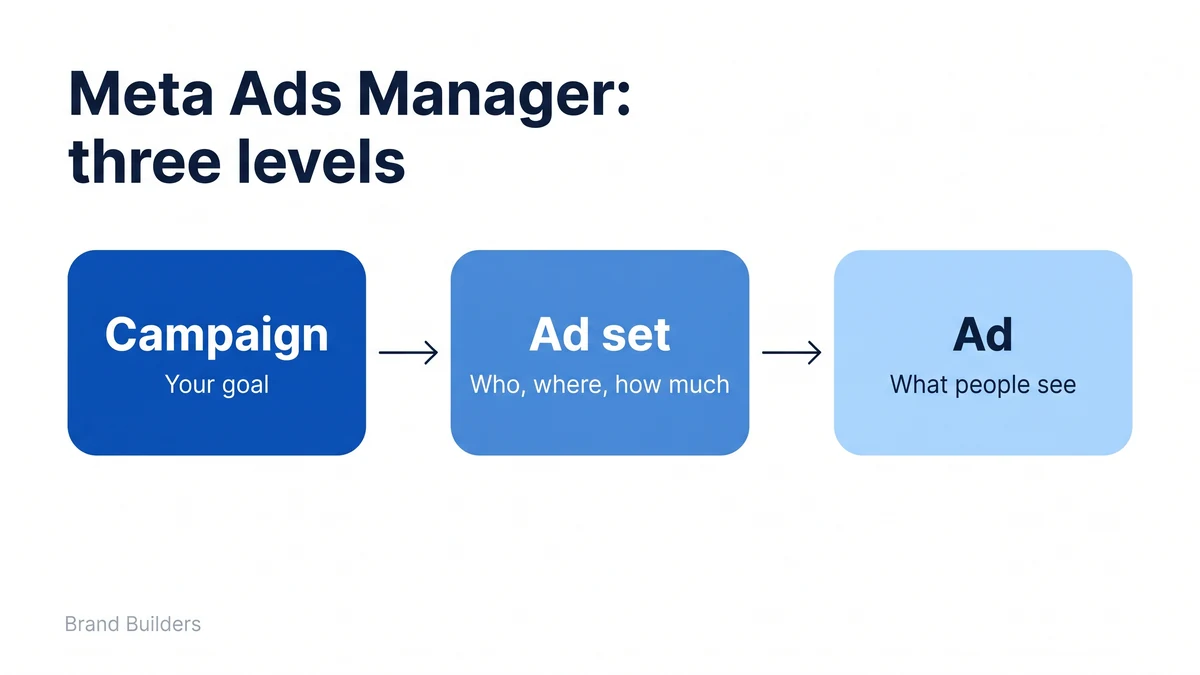
- Meta Ads Manager has three levels: campaign (goal), ad set (audience, placement, budget, schedule) and ad (what people see).
- Pick the campaign goal first, because it decides what Meta tries to get you.
- Read cost per result and results first, then reach, frequency and click through rate.
- Change one thing at a time and give an ad set a few days before you judge it.
- Boosting a post is not the same as running a campaign in Ads Manager.
Quick answer: Meta Ads Manager is the free tool where you create, run and track ads on Facebook and Instagram. It works on three levels: the campaign sets your goal, the ad set sets who sees it, where and for how much, and the ad is what people see. Brand Builders, a Lahore digital marketing agency, explains how to set it up and read the numbers.
Many Pakistani business owners open Meta Ads Manager once, get lost in the columns and close it. Others boost a post, see likes and wonder why no one calls.
The tool is not hard once you know how it is organised. This guide explains the three levels, the numbers worth watching and the mistakes that waste budget. Meta describes Ads Manager as an all in one tool for creating ads, managing when and where they run, and tracking how your campaigns perform.
We run Meta ads for businesses in Lahore and across Pakistan, so these are the points we explain on almost every first call.
Book a free Meta ads strategy session
What is Meta Ads Manager?
Meta Ads Manager is Meta's tool for running ads on Facebook, Instagram, Messenger and the Audience Network. You use it to build ads, choose who sees them and when, set a budget, and check how each ad performs. There is also an Ads Manager app, so you can watch results from your phone. The same account runs Facebook ads in Pakistan and Instagram ads, so you manage both in one place.
It is separate from your Facebook page. The page is your business identity. Ads Manager is where you spend money. You need an ad account and a page connected to it before ads can run. Our guide to how to run Facebook ads in Pakistan walks through that setup, step by step.
How is Meta Ads Manager organised?
Everything sits in three levels, and the order matters. A campaign contains one or more ad sets. An ad set contains one or more ads. The table shows what you decide at each level.
| Level | What you set here | Plain meaning |
|---|---|---|
| Campaign | The objective | What you want, such as messages, leads or sales |
| Ad set | Audience, placements, budget, schedule | Who sees it, where, for how much and when |
| Ad | Images, videos, text, headline, link | What people actually see and click |
Source: Meta Business Help Center, What are the advertising levels in Meta Ads Manager?
Ads in the same ad set share the same audience, placement, budget and schedule. So if you want to test two audiences, make two ad sets. If you want to test two pictures to the same audience, make two ads in one ad set.
Which campaign objective should you choose?
The ad objective is the first choice you make, so choose the one that matches the action you want, not the one that sounds most impressive. A shop that wants phone and WhatsApp enquiries needs a messages or leads goal. A brand that wants awareness needs reach. If you choose likes or traffic for a business that needs enquiries, Meta will find people who like or click, not people who buy.
Many Pakistani businesses sell through WhatsApp. For them, a click to WhatsApp campaign can fit well, and our guide to click to WhatsApp ads in Pakistan explains how it works and what to prepare.

What should you set at the ad set level?
The ad set is where most money is won or lost. Four things matter.
- Audience. Start with a clear location, such as your city or the areas you serve, and a sensible age range. A very narrow audience is not always better.
- Placements. These are the places your ad can appear, such as Facebook Feed or Instagram Stories. Check that your pictures and videos suit them.
- Budget. Pick a daily budget you can afford to leave on for a week. Our post on Facebook ads cost in Pakistan explains why costs vary so much.
- Schedule. Decide the start and end dates, or leave it running while you watch it.
Do not change the audience, budget and creative all in one day. You will not know which change helped.
What should you put in the ad itself?
The ad is what a person sees in a few seconds. Use a clear picture or short video that shows your product or place, a headline that says what you offer, one line of text and one button. The button should match the goal, for example Send Message for WhatsApp enquiries.
Show real prices or a clear offer where you can. People in Pakistan often decide from the first line, so put the main point there. Keep a record of which picture and headline you used, so you can tell what worked. A good first test is two ads with the same offer but a different picture, run for the same few days in the same ad set. Whichever gets the lower cost per result tells you what your customers respond to.
Want us to review your ad account?
How do you read the numbers in Meta Ads Manager?
The columns are where beginners get lost. Start with a short list. These are standard definitions for the main columns, and you can add more columns later.
| Column | What it tells you | Watch out for |
|---|---|---|
| Results | How many times your chosen goal happened | It depends on the objective you picked |
| Cost per result | What each result cost you | The most useful single number |
| Reach | How many different people saw the ad | Not the same as impressions |
| Impressions | How many times the ad was shown | One person can see it more than once |
| Frequency | Average times each person saw it | A high number can mean the ad is tired |
| Click through rate | The share of views that became clicks | A click is not always an enquiry |
Read results and cost per result first. Then look at frequency and click through rate to find out why the cost went up or down. If clicks are cheap but no one messages, the problem is usually the offer, the page or how fast you reply, not the tool.

What does a good weekly check look like?
Once a week, sit down for ten minutes and ask five questions.
- Which ad set has the lowest cost per result?
- Which ad is getting the most results?
- Is frequency climbing, so the same people see the ad too often?
- Did enquiries from the ads match the numbers in Ads Manager?
- Are we answering enquiries within minutes?
Pause the weakest ad, not the whole campaign. Keep the best one running and add one new ad to test against it. Over a few weeks this routine does more than any clever trick.
What are the most common mistakes in Meta Ads Manager?
- Judging too early. One day of data is noise. Give an ad set a few days before you decide.
- Changing everything at once. You cannot learn from a test that has five changes.
- Picking the wrong objective. The campaign goal decides who Meta shows the ad to.
- Sending clicks to a slow or confusing page. Fast replies and a clear page matter as much as the ad.
- Using a boost instead of a campaign. Boosting a post gives limited control. Read our story of a business that boosted a Facebook post and got zero results.
You can also look at what rivals run with the Facebook Ads Library, which is a free way to get ideas before you build your first campaign.

Conclusion
Meta Ads Manager makes sense once you see the three levels: campaign for the goal, ad set for the audience and budget, and ad for what people see. Pick the right objective, read cost per result first, change one thing at a time and check results weekly. Brand Builders in Johar Town, Lahore, runs Meta ads for businesses across Pakistan. If you want a second pair of eyes on your account, book a free strategy session and we will look at your market, your offer and your budget.
Brand Builders helps businesses across Pakistan with Meta Ads management. To get started, book a strategy session with our team or get in touch directly.
Book your free strategy sessionFrequently Asked Questions
01What is Meta Ads Manager?
Meta Ads Manager is the free tool where you create ads, choose when and where they run, set a budget and track results on Facebook, Instagram, Messenger and the Audience Network. It also comes as a mobile app. You need an ad account and a Facebook page connected to it before you can run ads.
02Is Meta Ads Manager free to use?
Yes, using the tool itself costs nothing. You pay Meta only for the ads you run, based on the budget you set. Our guide to Facebook ads cost in Pakistan explains what affects the price, and why you should set a small test budget before you scale up.
03What is the difference between a campaign, an ad set and an ad?
The campaign holds your objective. The ad set holds your audience, placements, budget and schedule. The ad holds the pictures, video, text and link that people see. One campaign can have several ad sets, and one ad set can have several ads, which makes testing easier.
04What numbers should I check first in Meta Ads Manager?
Start with results and cost per result for the goal you chose. Then check reach, frequency and click through rate to see why the cost moved. If clicks are high but enquiries are low, look at your offer, your page and how fast you reply to messages.
05Is boosting a post the same as running an ad in Ads Manager?
No. A boosted post is a quick way to promote one post with fewer settings. Ads Manager lets you pick an objective, build audiences, test several ads and read detailed results. For serious lead generation, a campaign in Ads Manager gives you more control.