
In this guide
- The Ad Library is free and shows ads that are currently running across Meta, including Facebook and Instagram.
- You search by keyword or by advertiser, and you can set the country to Pakistan.
- Each ad shows its status, start date, platforms, advertiser name, text and creative.
- It does not show how well an ad performed, so use it for ideas, not proof.
- Look for repeated offers, formats and buttons, then test your own version.
Quick answer: The Facebook Ads Library is a free Meta tool that lets you search the ads currently running on Facebook, Instagram and other Meta platforms. Choose Pakistan, pick All ads, then search a keyword or a business name to see the ads. It shows what competitors are running, not how much they earn from them. Brand Builders is a digital marketing agency in Lahore.
Many business owners ask the same thing before they spend on Meta ads: what are other businesses like mine already running? The Ad Library answers part of that for free.
This guide shows how to use the Ad Library step by step, what you will see for ads in Pakistan, and how to turn what you find into better ads of your own. We opened the tool on 16 November 2026 for the screenshots and notes below.
We build and run Meta ads for businesses across Pakistan, so these are the checks we use before we plan a campaign.
Book a free Meta ads strategy session
What is the Facebook Ads Library?
Meta calls it the Ad Library. Its front page says you can search all of the ads currently running across Meta technologies. It also covers ads about social issues, elections or politics that have run in the past seven years, ads that have run anywhere in the EU in the past year, and ads that have run in the UK in the past year.
Meta says an ad appears in the Ad Library within 24 hours of the time it gets its first impression. Changes to an ad also show up within 24 hours.
Source: Meta Ad Library, opened 16 November 2026.
For a business in Pakistan, the part that matters is the first line: you can search the ads currently running. In our test the tool opened without signing in to Facebook, though Meta may ask you to log in in some cases.
How do you search the Facebook Ads Library for Pakistan?
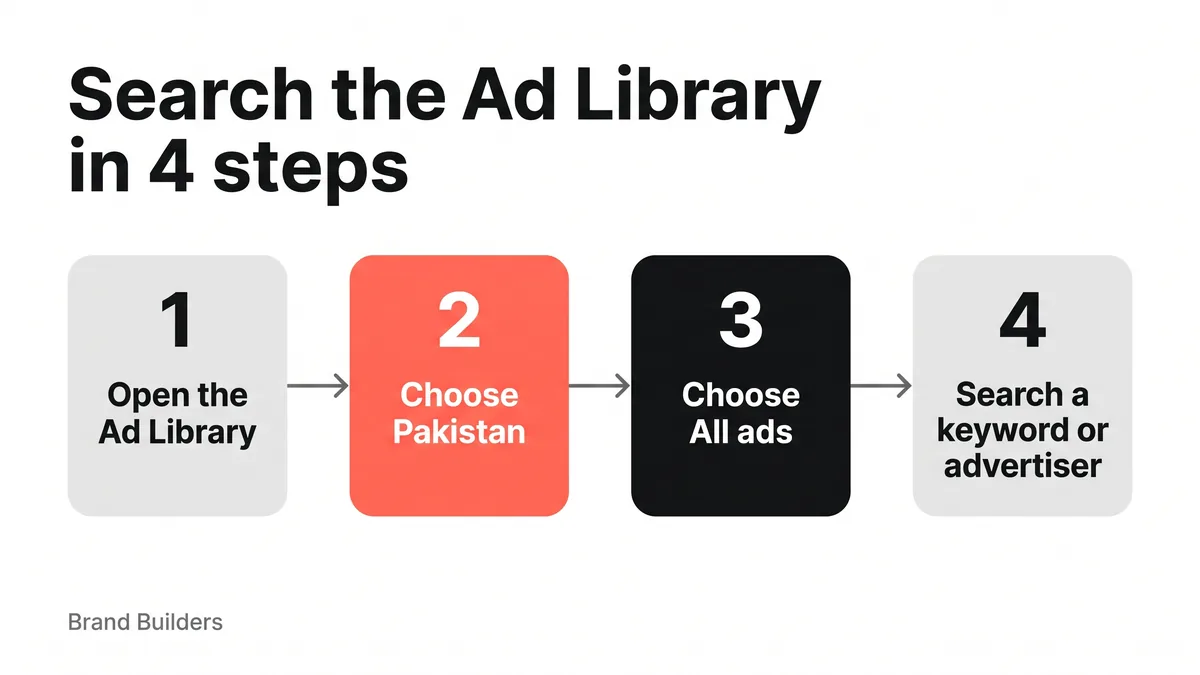
Follow these steps. They match the screen we saw on 16 November 2026.
- Open the Ad Library at facebook.com/ads/library.
- In the country box, choose Pakistan.
- Open Ad category and choose All ads.
- Type a keyword or an advertiser name in the search box and press Enter.
- Use Filters and Sort by to narrow the results.
Meta's page says: to find an ad, search for keywords or an advertiser. A keyword search looks for ads that match your words. An advertiser search looks for the ads of one page.
Source: Meta Ad Library search page, 16 November 2026.
Start with a keyword that a customer would use, such as the service plus your city. Then search the names of two or three direct competitors, one at a time.
What can you see for each ad?
In our search for the keyword dental clinic Lahore on 16 November 2026, the Ad Library returned about 58 results. Each result is a card. The cards showed:
- An Active label
- A Library ID, which is the ad's number in the library
- The date it started running
- Icons for the platforms it runs on
- A button called See ad details
- The advertiser name and the word Sponsored
- The ad text and the picture or video
- The button on the ad, such as a message or WhatsApp button
Some cards said that the ad has multiple versions. That means the advertiser is testing more than one version of the same ad.
When we opened one ad, the details window repeated the status, Library ID, start date, platforms, advertiser, text and creative. We did not see how much the advertiser spent or what results the ad brought.
Talk to Brand Builders about your Meta ads

What does the Ad Library not tell you?
It does not tell you whether an ad works. Meta's pages describe the Ad Library as a place to search ads that are running. For ads about social issues, elections or politics, Meta says it also shows who paid for the ad, a range of spend and reach. For ordinary business ads in Pakistan we saw none of that.
So you cannot tell from the library alone whether a competitor's ad brings customers. An ad that has been running for months suggests the advertiser keeps paying for it, but it does not prove it makes a profit. Treat it as a clue.
Keep these limits in mind:
- Spend, sales and cost per enquiry are not shown for ordinary ads in our test.
- You see the ad, not the audience it was aimed at.
- You see ads that are running now, so you may miss ads that ended.
- The same business can run many ads, so one search may show a long list.
How do you review competitor ads in 30 minutes?
You do not need a long study. A simple review gives you enough to plan a test.
- Pick 3 to 5 competitors in your city and one or two keywords that customers use.
- Search each one and open the ads that have been running longest, using the start date.
- Write down the offer in each ad, such as a discount, a free consultation or a limited time price.
- Note the format: single image, video, carousel or a mix.
- Note the button: message, call, WhatsApp or website.
- Note the words that repeat across several competitors.
- Note what nobody is saying. That is often where your best angle sits.
Put the notes in one sheet. Look for patterns, not single ads.

What should you look for in competitor ads?
Read the ads as a customer would. These are the points we check.
| What to check | Why it matters |
|---|---|
| The offer | Shows what prices and deals people in your city are used to |
| The first line of text | Shows how competitors grab attention |
| The picture or video | Shows what style is common, and what would stand out |
| The button | Shows whether competitors send people to WhatsApp, a call or a website |
| Start date and versions | Shows how long an ad has run and whether the advertiser is testing |
In our dental search many ads used a message or WhatsApp button. That fits how people in Pakistan often prefer to ask a question first. If your competitors all use a discount, a clear proof of quality or a fast reply promise may stand out more. Our guide on click to WhatsApp ads in Pakistan explains how to set one up.
How do you use what you find without copying?
Use the library for ideas, not for copying. Copying another business's pictures, words or logo is risky, and it also makes your ad look the same as theirs.
A better plan:
- Choose one angle that competitors are not using.
- Write your own text and use your own photos or video.
- Show what is real about your business, such as your doctors, your team or your premises.
- Test two versions with a small budget and keep the one that brings more enquiries.
- Check the cost per enquiry, not only clicks.
Our guide on Facebook ads cost in Pakistan shows how to plan a test budget, and how to run Facebook ads in Pakistan walks through the set up. If you are deciding between platforms, read Facebook ads vs Google ads in Pakistan.
Can you use the Ad Library to check your own ads?
Yes. Search your own business name to see what customers can find. Check that the ad text, offer and button are correct, and that the business name and picture look right. Meta says new ads and changes appear within 24 hours, so do not worry if a new ad is not there straight away.
It is also a quick way to check what your agency or a freelancer is running in your name. If an ad you did not approve shows up, ask them about it.
What are the Ad Library report and API?
Meta also offers an Ad Library report and an Ad Library API. Meta describes them as tools for ads about social issues, elections or politics. They are meant for researchers and journalists, so most business owners do not need them. The simple search on the Ad Library page is enough for competitor research.
If you want help turning this research into a campaign, our Meta ads service page explains what we do.
See what we would run for your business

Conclusion
The Facebook Ads Library is a free way to see what competitors in Pakistan are running before you spend on Meta ads. Choose Pakistan, search a keyword or a competitor, note the offers, formats and buttons, then test your own version. It will not tell you what earns money, but it will save you from planning in the dark. Brand Builders, in Johar Town, Lahore, can turn your research into a campaign, and we start with a free strategy session where we look at your market, your offer and your budget.
Brand Builders helps businesses across Pakistan with Meta Ads management. To get started, book a strategy session with our team or get in touch directly.
Book your free strategy sessionFrequently Asked Questions
01What is the Facebook Ads Library?
It is a free Meta tool, called the Meta Ad Library, where you can search the ads currently running across Meta, including Facebook and Instagram. You search by keyword or by advertiser and choose a country, such as Pakistan. It shows the ad, the advertiser and when it started, but not how well the ad performed.
02Do I need a Facebook account to use the Ad Library?
In our test on 16 November 2026 the Ad Library opened and searched without signing in. Meta's help pages we read do not say whether an account is required, so Meta may ask for a login in some cases. If you are asked to log in, use your own account.
03Can I see how much a competitor spends on Facebook ads?
Not for ordinary business ads in our test. The ad details showed the status, start date, platforms, advertiser, text and creative, but not spend or results. Meta says spend ranges and reach are shown for ads about social issues, elections or politics. Use the library for ideas, not for cost data.
04How do I search for ads in Pakistan?
Open facebook.com/ads/library, choose Pakistan in the country box, choose All ads in the ad category, then type a keyword or an advertiser name and press Enter. Use Filters and Sort by to narrow the list. Search your service plus your city, then search your main competitors by name.
05Is it legal to look at competitor ads in the Ad Library?
The Ad Library is a public tool that Meta provides for searching ads, so looking is fine. Copying a competitor's pictures, text or logo is a different matter and can cause problems, so make your own ads. We are an agency, not a law firm, so ask a lawyer if you need legal advice.