
In this guide
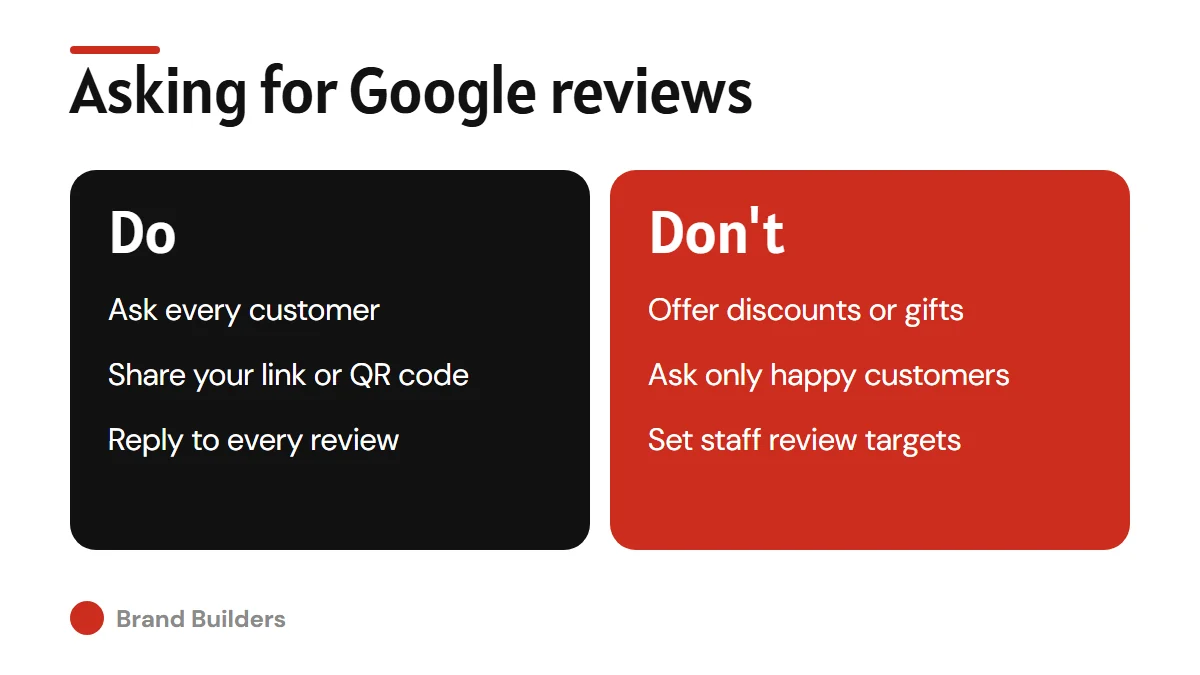
- Google says reviews must reflect a genuine experience, so do not offer discounts, gifts or payment for a review.
- You may ask customers to review you, as long as you do not pressure them, ask for specific wording or only ask happy customers.
- Get your review link and QR code from your Business Profile on a computer: Read reviews, then Get more reviews.
- Share the link on receipts, in thank you emails, at the end of a chat or on a printed QR code, and by WhatsApp.
- Reply to every review, good or bad, in a calm and honest voice.
Quick answer: To ask for Google reviews the right way, give every customer the same polite request with your review link or QR code, and never offer a reward. Google's rules say merchants may encourage genuine reviews but must not offer payment, discounts or free goods, must not pressure customers on the premises, and must not ask for specific content. Get your link in your Business Profile under Read reviews, then Get more reviews.
Reviews help people choose where to eat, which clinic to book and which agency to call. That is why so many Pakistani businesses ask for them, and why some cross the line. Offering a discount for a five star review or asking only happy customers can get reviews removed. This guide explains Google's own rules in plain words, how to get your review link and QR code, what to say and how to reply. We help Pakistani businesses with local SEO and Google Business Profile, so these are the questions we answer most.
Get help with your Google profile
What are Google's rules on asking for reviews?
Google says reviews and other contributions to Google Maps must reflect a genuine experience. Its Business Profile help page also says that offering incentives, such as free or discounted goods or services, in exchange for posting a review, changing a review or removing a negative review is considered fake and misleading content and is strictly prohibited.
Google's Maps policy lists what merchants may not do. They may not offer incentives such as payment, discounts, free goods or services for a review, or for the revision or removal of a negative review. They may not solicit or encourage content that is not a genuine experience. They may not post content on a competitor's page to harm its reputation.
Sources: Google Business Profile Help, Tips to get more reviews, and Google Maps User Generated Content Policy, Prohibited and restricted content, both opened 25 November 2026.
What is allowed when you ask for Google reviews?
The same policy says merchants may solicit or encourage the posting of content that does represent a genuine experience, without offering incentives and without trying to influence the rating or the contents of the review. In simple words: you can ask, politely, for an honest review, and you can make it easy. You cannot buy it, steer it or filter who gets asked.
What counts as pressure or selective asking?
Google's policy lists behaviours that it does not want. Merchants should not discourage or prohibit negative reviews, or selectively ask only the customers who are likely to leave positive ones. When asking, merchants should not require or pressure customers to leave ratings or write reviews while on the premises, and should not ask for specific content to be included. Google gives examples: asking staff to collect a certain number of reviews, or asking for reviews that include specific content, such as the name of a staff member.
In practice this means: no "please give us five stars", no review target for staff and no asking customers to mention a person by name. Ask everyone in the same neutral way.
How do you get your review link and QR code?
Google explains the steps on its help page. Use a computer, because reviews QR codes can only be generated in a computer browser, not on mobile.
Step 1: go to your Business Profile.
Step 2: select Read reviews, then Get more reviews.
Step 3: copy the review link, or right click the QR code and choose Save image as to download it.
Customers must be signed into a Google Account to leave a review, so keep the request short and the link one tap away.
Source: Google Business Profile Help, Create a Google link or QR code to request reviews, opened 25 November 2026.

Where should you share your review link?
Google suggests including the link or QR code on your receipts, in thank you emails, at the end of a chat interaction, and on a printed QR code displayed in your store. Its help page also says you can send review requests through email, a WhatsApp message or a Facebook post.
In Pakistan, WhatsApp is often the easiest. If you reply to customers on WhatsApp, add your review link at the end of the conversation. If you want a link that opens a chat with your own number from a website, bio or ad, our free WhatsApp link generator makes one in seconds.
What should you say when you ask?
Keep the message short, polite and the same for every customer. Here are three examples to adapt. Replace the brackets with your details.
After a visit: "Thank you for choosing [Business]. If you have a minute, we would value an honest review of your visit: [link]."
After a WhatsApp chat: "Thank you for your order. If you would like to share your experience, you can leave a review here: [link]. Your honest feedback helps us improve."
On a printed sign near the counter: "Share your experience on Google. Scan the code to leave an honest review."
Do not mention discounts, gifts or the number of stars. Do not ask people to write something specific.
When is the best time to ask?
Ask after the service is complete and the customer has had a chance to judge it, for example after a delivery, after a visit or at the end of a finished project. Ask once, with one gentle reminder at most. Ask every customer, not a hand picked few.
Set up a review process that follows the rules
How should you reply to reviews?
Google lists replying to reviews as best practice and says to value all reviews, because honest and balanced reviews help potential customers decide. Reply to the good ones with a short thank you. Reply to the bad ones calmly: thank the person, say sorry for the problem, offer to fix it offline and keep private details out of the reply.
A simple reply to a negative review: "Thank you for telling us. We are sorry your visit did not go as it should. Please message us on [number] so that we can look into it and put it right."
Never ask a reviewer to remove or change a review in exchange for something. Google treats that as prohibited too.
Mistakes to avoid
Discounts or gifts for reviews. Prohibited by Google, whatever the size of the reward.
Asking only happy customers. Selective asking is listed as behaviour to avoid.
Staff review targets. Google lists asking staff to solicit a certain number of reviews as an example of what not to do.
Reviews from your own team. The policy says content based on a conflict of interest is not allowed, and that can include current or former employment or family relationships.
Fake reviews or attacks on competitors. Both break the policy and can damage your profile.
Sudden bursts of reviews. The policy also mentions unusual volumes or patterns of reviews that look like manipulation. Steady, real requests are safer.
A 30 day plan
Week 1: get your link and QR code from your Business Profile on a computer. Print the QR code for the counter.
Week 2: write your three messages in English, Urdu or Roman Urdu and train staff to ask in the same neutral way.
Week 3: add the link to receipts, thank you messages and the end of WhatsApp chats.
Week 4: reply to every review you have, and write down what customers praise and what they complain about. Clinics can also read our guide to Google reviews for clinics in Pakistan, and if a competitor has far more reviews, see what to do when a competitor has more Google reviews. New to the platform? Start with how to register your business on Google Maps.

Conclusion
To ask for Google reviews safely, follow Google's rules: encourage genuine reviews, never offer rewards, ask every customer in the same neutral way and make it easy with your review link or QR code. Reply to every review calmly and honestly. Check Google's help pages from time to time, because rules can change. Brand Builders in Johar Town, Lahore, helps Pakistani businesses with local SEO and Google Business Profile. Book a free strategy session and we will look at your profile and your review process.
Brand Builders helps businesses across Pakistan with SEO services. To get started, book a strategy session with our team or get in touch directly.
Book your free strategy sessionFrequently Asked Questions
01Can I offer a discount for a Google review?
No. Google says offering incentives, such as payment, discounts, free goods or services, in exchange for posting a review, changing one or removing a negative one is fake and misleading content and is prohibited. Ask politely for an honest review and make it easy, but never reward it.
02Am I allowed to ask customers for reviews at all?
Yes. Google's policy allows merchants to solicit or encourage genuine reviews, as long as there is no incentive and no attempt to influence the rating or the content. Ask every customer in the same neutral way and do not pressure them or ask for specific words.
03How do I get my Google review link or QR code?
Use a computer. Open your Business Profile, select Read reviews, then Get more reviews. Copy the link, or right click the QR code and choose Save image as. Google says reviews QR codes can only be generated in a computer browser, not on mobile.
04Can I send the review link on WhatsApp?
Yes. Google's help page says you can send review requests through email, a WhatsApp message or a Facebook post. Keep the message short, send the same one to every customer and never mention rewards or the number of stars you hope for.
05Should I reply to negative reviews?
Yes. Google lists replying to reviews as best practice and says to value all reviews, because honest and balanced reviews help customers decide. Thank the person, say sorry for the problem, offer to fix it privately and avoid sharing personal details in public.